
• Software
    • DNASTAR Lasergene
      • Lasergene Molecular Biology
      • Lasergene Genomics
      • Lasergene Protein
  • Workflows
    • Molecular Biology Workflows
      • Automated Virtual Cloning
      • Clone Sequence Verification
      • ELN Integration
      • Gel Electrophoresis Simulation
      • Gene Homology Alignment
      • Multiple Sequence Alignment
      • Pairwise Sequence Alignment
      • PCR Site-Directed Mutagenesis
      • PCR Primer Design
      • Phylogenetic Analysis
      • Plasmid Maps
      • Sanger Sequence Assembly
      • Sequence Editing and Annotation
  • Protein Analysis
    • Antibody Modeling
    • Antibody Phage Display
    • Epitope Prediction
    • Protein Docking
    • Protein Sequence Analysis
    • Protein Stability Prediction
    • Protein Structural Alignment
    • Protein Structure Analysis
    • Protein Structure Prediction
  • Genomics
    • Clinical Research
    • De Novo Genome Assembly
    • Mauve Genome Alignment
    • Metagenomic Assembly
    • Variant Analysis
    • Viral Genome Analysis
    • Whole Genome/Whole Exome
  • Transcriptomics
    • ChIP-Seq Data Analysis
    • De Novo Transcriptome Assembly
    • RNA-Seq Alignment
  • Services
    • Protein Services
    • Genomic Services
  • Pricing
  • Resources
    • KNOWLEDGE CENTER
      • User Guides and Tutorials
      • Product Literature
      • Product Releases
      • Product Notifications
      • Supported File Formats
      • Technical Requirements
      • Citations
    • WEBINARS & EVENTS
    • BLOG
    • LICENSING OPTIONS
  • About
    • Careers
    • Distributors
    • Legal Information
    • Privacy Policy
  • Contact
  • Free Trial

Lasergene 19.0 Release Notes

REQUEST FREE TRIAL
MY ACCOUNT
DNASTARDNASTAR
  • Software
    • DNASTAR Lasergene
      Full Suite
    • Lasergene Molecular Biology
    • Lasergene Genomics
    • Lasergene Protein
  • Workflows
    • Molecular Biology
      • Automated Virtual Cloning
      • Clone Sequence Verification
      • ELN Integration
      • Gel Electrophoresis Simulation
      • Gene Homology Alignment
      • Multiple Sequence Alignment
      • Pairwise Sequence Alignment
      • PCR Site-Directed Mutagenesis
      • PCR Primer Design
      • Phylogenetic Analysis
      • Plasmid Maps
      • Sanger Sequence Assembly
      • Sequence Editing and Annotation
    • Protein Analysis
      • Antibody Modeling
      • Antibody Phage Display
      • Epitope Prediction
      • Protein Docking
      • Protein Sequence Analysis
      • Protein Stability Prediction
      • Protein Structural Alignment
      • Protein Structure Analysis
      • Protein Structure Prediction
    • Genomics
      • Clinical Research
      • De Novo Genome Assembly
      • Mauve Genome Alignment
      • Metagenomic Assembly
      • Variant Analysis
      • Viral Genome Analysis
      • Whole Exome/Genome Sequencing
    • Transcriptomics
      • ChIP-Seq Data Analysis
      • De Novo Transcriptome Assembly
      • RNA-Seq Alignment and Analysis
  • Services
    • Protein Services
    • Genomic Services
  • Pricing
  • Resources
    • KNOWLEDGE CENTER
      • User Guides and Tutorials
      • Product Literature
      • Product Releases
      • Product Notifications
      • Supported File Formats
      • Technical Requirements
      • Citations
    • WEBINARS
    • NEWS AND EVENTS
    • BLOG
    • LICENSING OPTIONS
  • About
    • Careers
    • Distributors
    • Legal Information
    • Privacy Policy
  • Contact
  • Search
  • Free Trial

Two ways to find the best MegAlign Pro multiple sequence alignment method for your data

Home » Two ways to find the best MegAlign Pro multiple sequence alignment method for your data

Two ways to find the best MegAlign Pro multiple sequence alignment method for your data

September 11, 2020 Sequence Analysis

If your work involves the study of evolutionary relationships, you know that it can be hard to choose the right multiple sequence alignment (MSA) algorithm for your data.

If you’re doing a whole-genome alignment in MegAlign Pro and have nucleotide sequences, there’s no contest: Mauve is the best MegAlign Pro algorithm for you. But what if you are doing the more common gene-level alignments? MegAlign Pro offers four popular algorithms that  work for both nucleotide and protein sequences: Clustal Omega, Clustal W, MAFFT and MUSCLE. These algorithms all have user-editable options for speed, capacity, algorithm and more. Which of these methods is the “best”?

A published comparison of the same four gene-level alignment algorithms available in MegAlign Pro showed that no one method was universally superior to the others. Algorithms that worked great with one data set could be the worst option for a different data set. That’s why it’s important to try different alignment algorithms and settings to learn which ones produce the best result for your data.

That said, it is possible to make general recommendations about the best starting algorithm for a particular situation. In this blog post, we’ll provide two solutions for choosing the best “starting” alignment algorithm for your needs.
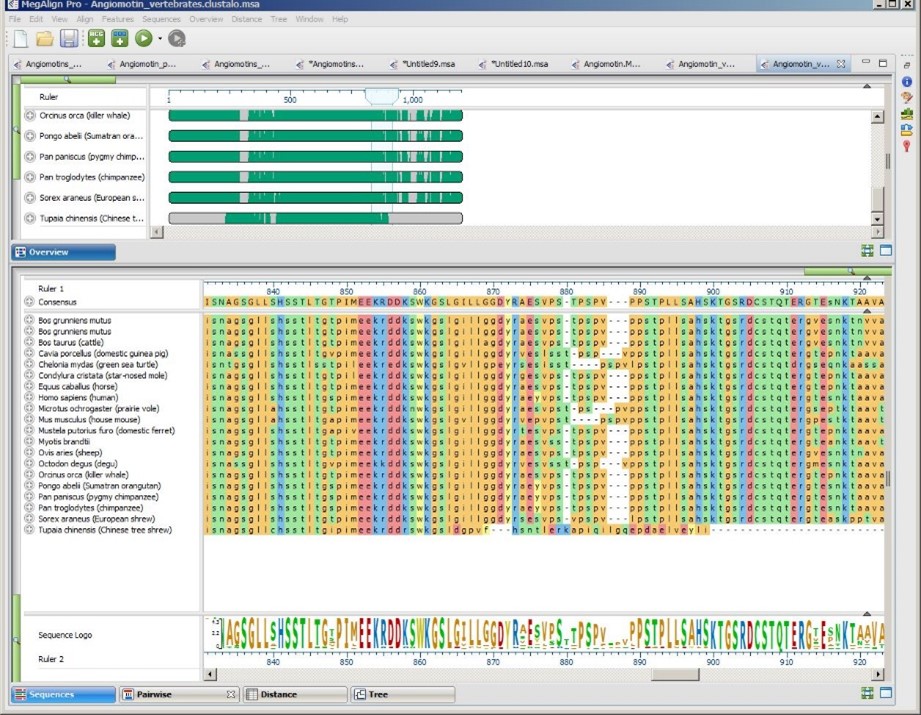
MegAlign Pro after performing a multiple alignment.

Option 1: Choose based on speed, accuracy and/or customization options

If you want to choose the perfect balance between speed, accuracy and/or customization, we have developed the following flowchart to help you choose the best starting algorithm. Note that this chart includes MegAlign Pro’s multiple and pairwise alignment methods.
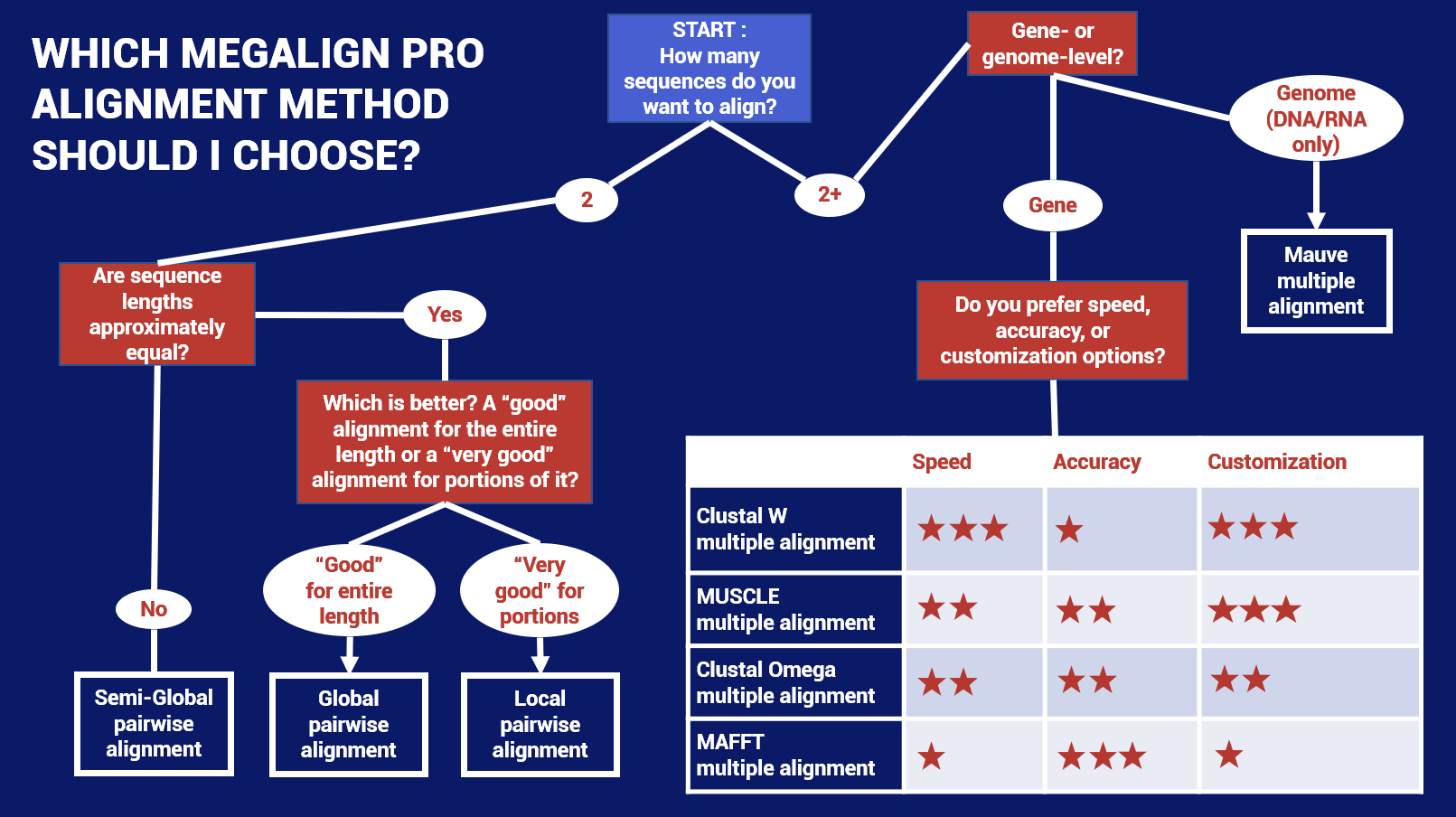
Flowchart for choosing a starting method for multiple sequence alignment in MegAlign Pro.

Option 2: Optimize for capacity or special circumstances

If you prefer to optimize based on the number and/or size of your sequences or on other criteria, choose your situation from the following list to see which method we recommend that you start with.


I have genome-length nucleotide sequences OR…

My nucleotide sequences are not on the same strand OR…

My nucleotide sequences contain large rearrangements (e.g., inversions, translocations)

Use Mauve. Mauve is MegAlign Pro’s only genome-level aligner and only algorithm capable of producing a multi-block alignment or an alignment when one or more of the sequences are rearranged relative to one another. Mauve uses MUSCLE to create multiple alignments for each block that contains more than a single sequence. The main disadvantage with Mauve is that its fine-scale gapping not as good as MegAlign Pro’s four gene-level alignment methods described below.

Mauve was originally developed by Aaron Darling, Bob Mau, and Nicole Perna in 2010 at the Genome Evolution Laboratory at the University of Wisconsin-Madison.
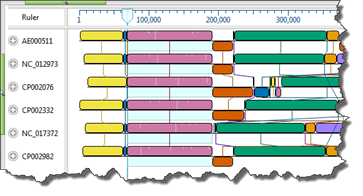
MegAlign Pro view showing blocks in a finished Mauve alignment.

Links:

  • MegAlign Pro tutorial “Genomic alignment with Mauve”
  • MAUVE website


I have fewer than fifty “short” (< 1kb) DNA, RNA, or protein sequences

Start with ClustalW. The Clustal W alignment algorithm is faster than Clustal Omega (reference), though its maximum accuracy is only obtained if you select the default “Slow-Accurate” option in MegAlign Pro’s ClustalW settings panel. A disadvantage to this method is that it does not always handle end gaps ideally. ClustalW was developed by JD Thompson et al. in 1994 at the European Molecular Biology Laboratory, Heidelberg, Germany.

Links:

  • ClustalW website


I need to do a gene-level alignment of up to thousands of DNA, RNA, or protein sequences AND/OR…

I want to specify that one of the sequences be used as a reference sequence for the alignment

Start with MAFFT. The MAFFT alignment algorithm is based on Fourier transformation and has several editable options. At least one paper found it to be the most accurate of the four gene-level algorithms (reference). Another found that it gave “structurally consistent alignments” for RNA data specifically (reference). When using long sequences, the algorithm performs best if the sequences are closely related. MAFFT was developed by Katoh M & Kumar M (2002) at the Computational Biology Research Center.

UPDATE (2/22/22): With the release of Lasergene 17.3.1 in January 2022, MAFFT now supports alignment of up to 10,000 viral genome sequences. The updated MAFFT algorithm also allows you to specify a reference sequence. To learn how to do this, see the MegAlign Pro User Guide topic MAFFT alignment options.

Links:

  • MAFFT website


I need to do a gene-level alignment of up to thousands of taxa and have DNA, RNA, or protein sequences

Start with MUSCLE. The MUSCLE sequence alignment method has many editable options and one paper found it to be faster than Clustal Omega alignment (reference).

MUSCLE was developed by independent bioinformatician Dr. Robert Edgar in 2004.

Links:

  • MegAlign Pro tutorial “MUSCLE alignment with multi-segment sequences”
  • MUSCLE  website
  • MUSCLE manual
  • Article describing the algorithm
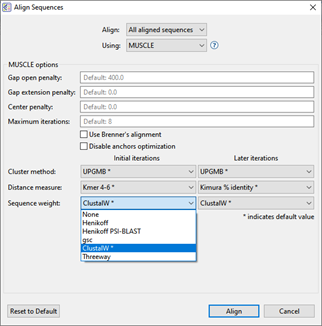
MegAlign Pro provides customizable settings for each alignment algorithm. MUSCLE options are shown here.

I have a small number of protein sequences

Start with Clustal Omega. This method was designed for protein sequences but can also be used for nucleotides. It has several editable options. The developers state it is more accurate than ClustalW. It’s also very fast, aligning hundreds of thousands of sequences in a few hours. Clustal Omega was developed by F Sievers et al. in 2011 at University College Dublin.

UPDATE (2/22/22): If you have a large number of protein (or any other type of sequences), use MAFFT rather than Clustal Omega. The version of MAFFT included in Lasergene 17.3.1 (released Jan. 2022) has the highest capacity of any available alignment algorithm.

Links:

  • MegAlign Pro tutorial “Clustal Omega alignment“
  • Clustal Omega website
  • Article describing the algorithm
  • Article detailing latest additions to the algorithm
  • Article describing its use with protein sequences

We hope this blog post has given you some ideas for how to choose a multiple alignment method that will work as the optimal starting point for your data set.

Would you like to try these workflows for yourself? Click the button to request a fully-functional 14-day free trial of Lasergene, including the MegAlign Pro application. Both downloadable and online trials are available.

TRY LASERGENE FREE

Want to learn more or see a video about multiple sequence alignment?

Click the button to visit our “Multiple Sequence Alignment” workflow page.
LEARN MORE
Share
0

You also might be interested in

Lasergene 18.1.1 Release Notes

Lasergene 18.1.1 Release Notes

Nov 3, 2025

Lasergene 18.1.1 is a patch release that fixes issues in SeqMan Ultra and GenVision Pro and improves overall stability.

ArrayStar displays a “stat value missing” error when attempting to open certain RNA-Seq assemblies

ArrayStar displays a “stat value missing” error when attempting to open certain RNA-Seq assemblies

Mar 21, 2024

Date: 3/21/24 Version Affected: Lasergene 17.5 and earlier (when used on or after 3/21/2024) Version Fixed: Lasergene 17.6

New protein structure modeled in Protean 3D

Lasergene 17.4.3 Release Notes

May 16, 2023

Lasergene 17.4.3 is a minor release that addresses two issues that some users were experiencing in Protean 3D.

Leave a Reply

Your email is safe with us.
Cancel Reply

Search Blog Posts

  • CATEGORIES

    • Genomics
    • Protein Analysis & Modeling
    • Sequence Analysis
    • Transcriptomics

Recent Posts

  • How to Create the Best Phylogenetic Tree for Your Data Using MegAlign Pro April 3, 2026
  • Improving Genome Assemblies with PacBio HiFi Sequencing April 14, 2025
  • Phased Variant (Haplotype) Analysis for Whole Genome Sequencing November 14, 2024
  • What Can We Learn from Gene Homology Analysis? May 23, 2024
  • How to Assemble Genomes like a Bioinformatics Pro October 17, 2023
[show_tag]

Archives

Find us on

Most Commented Posts

  • Comprehensive Variant Analysis Webinar By Anne Stover on November 3, 2022 6
  • Compatibility issues with macOS Big Sur By Sharon Page on November 10, 2020 3
  • Accurate Protein Structure Prediction Webinar By Anne Stover on September 27, 2022 3

Would you like to receive technical tips and special offers straight to your inbox?

DNASTAR
Pricing Workflows Training Software Resources Contact Us

Would you like to receive technical tips and special offers straight to your inbox?

2026 - DNASTAR Privacy Policy
Prev Next
This website uses cookies to improve user experience and understand our web usage. By continuing to use our website, you consent to our use of cookies. Accept
Privacy & Cookies Policy

Privacy Overview

This website uses cookies to improve your experience while you navigate through the website. Out of these, the cookies that are categorized as necessary are stored on your browser as they are essential for the working of basic functionalities of the website. We also use third-party cookies that help us analyze and understand how you use this website. These cookies will be stored in your browser only with your consent. You also have the option to opt-out of these cookies. But opting out of some of these cookies may affect your browsing experience.
Necessary
Always Enabled
Necessary cookies are absolutely essential for the website to function properly. This category only includes cookies that ensures basic functionalities and security features of the website. These cookies do not store any personal information.
Non-necessary
Any cookies that may not be particularly necessary for the website to function and is used specifically to collect user personal data via analytics, ads, other embedded contents are termed as non-necessary cookies. It is mandatory to procure user consent prior to running these cookies on your website.
SAVE & ACCEPT