
• Software
    • DNASTAR Lasergene
      • Lasergene Molecular Biology
      • Lasergene Genomics
      • Lasergene Protein
  • Workflows
    • Molecular Biology Workflows
      • Automated Virtual Cloning
      • Clone Sequence Verification
      • ELN Integration
      • Gel Electrophoresis Simulation
      • Gene Homology Alignment
      • Multiple Sequence Alignment
      • Pairwise Sequence Alignment
      • PCR Site-Directed Mutagenesis
      • PCR Primer Design
      • Phylogenetic Analysis
      • Plasmid Maps
      • Sanger Sequence Assembly
      • Sequence Editing and Annotation
  • Protein Analysis
    • Antibody Modeling
    • Antibody Phage Display
    • Epitope Prediction
    • Protein Docking
    • Protein Sequence Analysis
    • Protein Stability Prediction
    • Protein Structural Alignment
    • Protein Structure Analysis
    • Protein Structure Prediction
  • Genomics
    • Clinical Research
    • De Novo Genome Assembly
    • Mauve Genome Alignment
    • Metagenomic Assembly
    • Variant Analysis
    • Viral Genome Analysis
    • Whole Genome/Whole Exome
  • Transcriptomics
    • ChIP-Seq Data Analysis
    • De Novo Transcriptome Assembly
    • RNA-Seq Alignment
  • Services
    • Protein Services
    • Genomic Services
  • Pricing
  • Resources
    • KNOWLEDGE CENTER
      • User Guides and Tutorials
      • Product Literature
      • Product Releases
      • Product Notifications
      • Supported File Formats
      • Technical Requirements
      • Citations
    • WEBINARS & EVENTS
    • BLOG
    • LICENSING OPTIONS
  • About
    • Careers
    • Distributors
    • Legal Information
    • Privacy Policy
  • Contact
  • Free Trial

Lasergene 19.0 Release Notes

REQUEST FREE TRIAL
MY ACCOUNT
DNASTARDNASTAR
  • Software
    • DNASTAR Lasergene
      Full Suite
    • Lasergene Molecular Biology
    • Lasergene Genomics
    • Lasergene Protein
  • Workflows
    • Molecular Biology
      • Automated Virtual Cloning
      • Clone Sequence Verification
      • ELN Integration
      • Gel Electrophoresis Simulation
      • Gene Homology Alignment
      • Multiple Sequence Alignment
      • Pairwise Sequence Alignment
      • PCR Site-Directed Mutagenesis
      • PCR Primer Design
      • Phylogenetic Analysis
      • Plasmid Maps
      • Sanger Sequence Assembly
      • Sequence Editing and Annotation
    • Protein Analysis
      • Antibody Modeling
      • Antibody Phage Display
      • Epitope Prediction
      • Protein Docking
      • Protein Sequence Analysis
      • Protein Stability Prediction
      • Protein Structural Alignment
      • Protein Structure Analysis
      • Protein Structure Prediction
    • Genomics
      • Clinical Research
      • De Novo Genome Assembly
      • Mauve Genome Alignment
      • Metagenomic Assembly
      • Variant Analysis
      • Viral Genome Analysis
      • Whole Exome/Genome Sequencing
    • Transcriptomics
      • ChIP-Seq Data Analysis
      • De Novo Transcriptome Assembly
      • RNA-Seq Alignment and Analysis
  • Services
    • Protein Services
    • Genomic Services
  • Pricing
  • Resources
    • KNOWLEDGE CENTER
      • User Guides and Tutorials
      • Product Literature
      • Product Releases
      • Product Notifications
      • Supported File Formats
      • Technical Requirements
      • Citations
    • WEBINARS
    • NEWS AND EVENTS
    • BLOG
    • LICENSING OPTIONS
  • About
    • Careers
    • Distributors
    • Legal Information
    • Privacy Policy
  • Contact
  • Search
  • Free Trial

GENE HOMOLOGY ALIGNMENT

Go beyond sequence similarity to understand evolutionary relationships and gene function PRICING REQUEST FREE TRIAL

Use MegAlign Pro to uncover gene homology from genomic sequence data

Gene homology analysis allows us to better understand evolutionary relationships between organisms and to infer the functions of genes. Understanding sequence homology empowers scientists in a variety of fields, from archaeology and ecology to virology and drug discovery, to advance their research and make important connections from sequencing data.

MegAlign Pro not only supports gene homology alignments for large data sets, including from whole chromosomes or entire bacterial genomes, but also presents the results in a way that clearly elucidates the evolutionary relationships between samples. The guided gene homology workflow in MegAlign Pro prompts you to select a reference sequence and upload sequence data for a bacterial genome or eukaryotic chromosome. Then MegAlign Pro identifies a subset of homologous genes and creates a concatenated protein sequence from each genome. The software automatically aligns these amino acid sequences against a reference sequence using the MAFFT alignment algorithm. The results include a phylogenetic tree and a comprehensive homologs table. Both of these can be fully customized with the data, layout and colors you prefer, and then exported as publication-quality images.
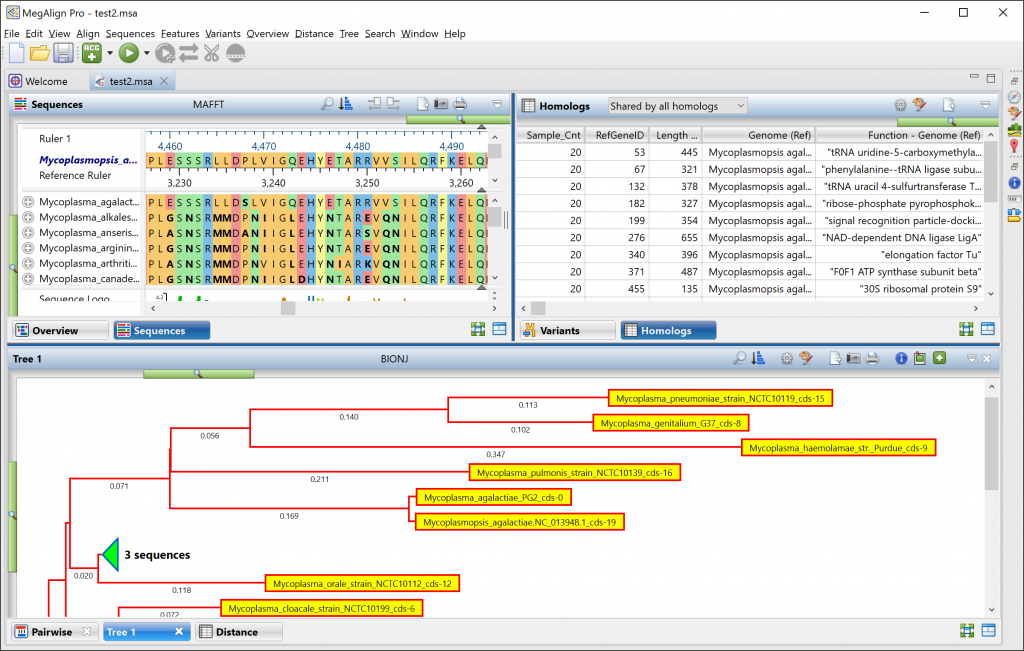
Sequence homology analysis in 4 simple steps
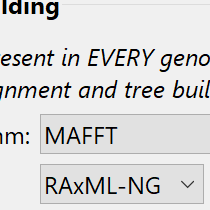
Step 1

Specify sequences and alignment options

2024-06-19_17-57-41

Step 2

Run the assembly

Step 3

Generate and compare phylogenetic trees
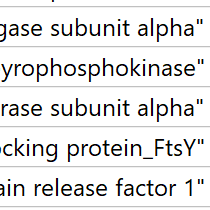
Step 4

View customizable tables of homologs

computer

Learn more about our Sequence Homology Analysis Software

Resources | Tutorials | FAQs | User Guide

PRICING
REQUEST FREE TRIAL

Resources

Please see the resources below for more information on performing sequence alignment and gene homology analysis with MegAlign Pro.

Video Icon

Webinar: Gene Homology at Scale

Watch the Webinar

Webinar Icon

What Can We Learn from Gene Homology Analysis?

Read the Blog Post

Webinar Icon

User Guide: Perform a Gene Homology Alignment

See the Topic

Webinar Icon

How this workflow was used to identify an unculturable bacterial strain in a hospital patient

Read the Paper

Tutorials

Watch one of our videos or check out one of our written tutorials to learn more about using our sequence alignment software, MegAlign Pro.

Analyze Gene Homology with MegAlign Pro

Gene homology analysis can determine whether organisms share a common ancestor and is used in fields such as evolutionary and molecular biology, virology, ecology, pharmacy, and anthropology. Learn how to use MegAlign Pro to set up and run a gene homology alignment and analyze the results.

Adding Sequence Files for Alignment in MegAlign Pro

Learn how to load different nucleotide and protein sequences into MegAlign Pro for multiple and pairwise sequence alignment and phylogenetic trees. This video walks you through different ways to add and organize your sequence data prior to performing an alignment.

Supported File Types in MegAlign Pro

Learn about the different files types supported by MegAlign Pro, including FASTA files and GenBank files.

FAQs

What is the difference between gene homology or sequence homology and sequence similarity?

The link between sequence homology and sequence similarity (or identity) is often misunderstood. Simply put, sequence similarity indicates the percentage of similar residues between two sequences. By contrast, sequence homology is an inference drawn from the results of sequence similarity. Genes that share a common ancestor are referred to as homologs. To learn more, check out this blog post.

What methods does MegAlign Pro offer for computing phylogeny?

MegAlign Pro offers three methods for generating phylogenetic trees. The Neighbor Joining method uses the BIONJ algorithm. RAxML and its newer sibling, RAxML-NG are both used to create trees based on Maximum Likelihood calculations. RAxML-NG’s next generation algorithm is faster and has a larger capacity than its predecessor and is the default method for the gene homology analysis workflow.

Does MegAlign Pro support multiple phylogenetic trees in a single project?

Yes. MegAlign Pro makes it easy to have multiple trees for a single alignment, so that you can easily compare using different phylogenetic methods or changes to the alignment.

How do I export an image of my multiple sequence alignment?

Choose File > Export Image > (View Name) and choose the export format: Adobe PDF (.pdf), Microsoft PowerPoint-optimized (.pptx), PNG image (.png) or JPG image (.jpg, .jpeg).

Can I modify my multiple sequence alignment?

Lasergene’s sequence alignment software, MegAlign Pro, supports multiple ways to modify an alignment. You can:…

Lasergene’s sequence alignment software, MegAlign Pro, supports multiple ways to modify an alignment. You can:

  • Trim ends at the beginning or end of an alignment.
  • Realign a range of aligned sequences using different parameters or a different alignment engine.
  • Merge two existing completed alignments together.
  • Add all/selected sequences from the “Unaligned Sequences” area into the current alignment, while retaining all of the gaps of the original, pre-merge alignment.
  • Realign existing aligned sequences plus selected unaligned sequences
Show more

Can I modify individual sequences within my multiple sequence alignment?

Yes. MegAlign Pro gives you the ability to reverse complement, edit, and trim individual sequences within an alignment.

What’s the easiest way to find sequence matches for my consensus sequence?

MegAlign Pro’s Search wizard, accessed using Search > Sequence Search, lets you search a query sequence against one of NCBI’s BLAST databases. The sequence can be part or all of an active sequence, another sequence file on your computer, or typed/pasted-in text.

Ready to learn more? PRICING START FREE TRIAL computer

Would you like to receive technical tips and special offers straight to your inbox?

DNASTAR
Pricing Workflows Training Software Resources Contact Us

Would you like to receive technical tips and special offers straight to your inbox?

2026 - DNASTAR Privacy Policy
This website uses cookies to improve user experience and understand our web usage. By continuing to use our website, you consent to our use of cookies. Accept
Privacy & Cookies Policy

Privacy Overview

This website uses cookies to improve your experience while you navigate through the website. Out of these, the cookies that are categorized as necessary are stored on your browser as they are essential for the working of basic functionalities of the website. We also use third-party cookies that help us analyze and understand how you use this website. These cookies will be stored in your browser only with your consent. You also have the option to opt-out of these cookies. But opting out of some of these cookies may affect your browsing experience.
Necessary
Always Enabled
Necessary cookies are absolutely essential for the website to function properly. This category only includes cookies that ensures basic functionalities and security features of the website. These cookies do not store any personal information.
Non-necessary
Any cookies that may not be particularly necessary for the website to function and is used specifically to collect user personal data via analytics, ads, other embedded contents are termed as non-necessary cookies. It is mandatory to procure user consent prior to running these cookies on your website.
SAVE & ACCEPT