

• Software
    • DNASTAR Lasergene
      • Lasergene Molecular Biology
      • Lasergene Genomics
      • Lasergene Protein
  • Workflows
    • Molecular Biology Workflows
      • Automated Virtual Cloning
      • Clone Sequence Verification
      • ELN Integration
      • Gel Electrophoresis Simulation
      • Gene Homology Alignment
      • Multiple Sequence Alignment
      • Pairwise Sequence Alignment
      • PCR Site-Directed Mutagenesis
      • PCR Primer Design
      • Phylogenetic Analysis
      • Plasmid Maps
      • Sanger Sequence Assembly
      • Sequence Editing and Annotation
  • Protein Analysis
    • Antibody Modeling
    • Antibody Phage Display
    • Epitope Prediction
    • Protein Docking
    • Protein Sequence Analysis
    • Protein Stability Prediction
    • Protein Structural Alignment
    • Protein Structure Analysis
    • Protein Structure Prediction
  • Genomics
    • Clinical Research
    • De Novo Genome Assembly
    • Mauve Genome Alignment
    • Metagenomic Assembly
    • Variant Analysis
    • Viral Genome Analysis
    • Whole Genome/Whole Exome
  • Transcriptomics
    • ChIP-Seq Data Analysis
    • De Novo Transcriptome Assembly
    • RNA-Seq Alignment
  • Services
    • Protein Services
    • Genomic Services
  • Pricing
  • Resources
    • KNOWLEDGE CENTER
      • User Guides and Tutorials
      • Product Literature
      • Product Releases
      • Product Notifications
      • Supported File Formats
      • Technical Requirements
      • Citations
    • WEBINARS & EVENTS
    • BLOG
    • LICENSING OPTIONS
  • About
    • Careers
    • Distributors
    • Legal Information
    • Privacy Policy
  • Contact
  • Free Trial

Lasergene 19.0.1 Release Notes

REQUEST FREE TRIAL
MY ACCOUNT
DNASTARDNASTAR
  • Software
    • DNASTAR Lasergene
      Full Suite
    • Lasergene Molecular Biology
    • Lasergene Genomics
    • Lasergene Protein
  • Workflows
    • Molecular Biology
      • Automated Virtual Cloning
      • Clone Sequence Verification
      • ELN Integration
      • Gel Electrophoresis Simulation
      • Gene Homology Alignment
      • Multiple Sequence Alignment
      • Pairwise Sequence Alignment
      • PCR Site-Directed Mutagenesis
      • PCR Primer Design
      • Phylogenetic Analysis
      • Plasmid Maps
      • Sanger Sequence Assembly
      • Sequence Editing and Annotation
    • Protein Analysis
      • Antibody Modeling
      • Antibody Phage Display
      • Epitope Prediction
      • Protein Docking
      • Protein Sequence Analysis
      • Protein Stability Prediction
      • Protein Structural Alignment
      • Protein Structure Analysis
      • Protein Structure Prediction
    • Genomics
      • Clinical Research
      • De Novo Genome Assembly
      • Mauve Genome Alignment
      • Metagenomic Assembly
      • Variant Analysis
      • Viral Genome Analysis
      • Whole Exome/Genome Sequencing
    • Transcriptomics
      • ChIP-Seq Data Analysis
      • De Novo Transcriptome Assembly
      • RNA-Seq Alignment and Analysis
  • Services
    • Protein Services
    • Genomic Services
  • Pricing
  • Resources
    • KNOWLEDGE CENTER
      • User Guides and Tutorials
      • Product Literature
      • Product Releases
      • Product Notifications
      • Supported File Formats
      • Technical Requirements
      • Citations
    • WEBINARS
    • NEWS AND EVENTS
    • BLOG
    • LICENSING OPTIONS
  • About
    • Careers
    • Distributors
    • Legal Information
    • Privacy Policy
  • Contact
  • Search
  • Free Trial

Local BLAST Searching in Lasergene

Bring BLAST Searches In-House: Fast, Private, and Flexible

Lasergene applications have long offered integrated sequence similarity and text-based searches using NCBI’s BLAST and Entrez servers. While those resources remain invaluable, not every research environment allows external searches — and not every dataset belongs in the public domain.

With Local BLAST, you can run BLAST searches entirely offline, using databases that you create and manage on your own system. Local BLAST is available in all Lasergene applications that support online BLAST: SeqBuilder Pro, SeqMan Ultra, MegAlign Pro, Protean 3D, and GenVision Pro.

Why do a Local BLAST search?

  • Data security and privacy — search proprietary or sensitive sequences without sending them outside your institution.
  • Flexibility — create, customize, and maintain your own searchable databases, including both public and proprietary sequence data.
  • Performance — internal benchmarks show that local BLAST searches are over 25X faster than searches sent to NCBI, and more than 5X faster than running BLAST directly on the NCBI site
Easy Setup, No IT Skills Required

Traditionally, setting up Local BLAST required downloading and configuring NCBI tools on your own. Lasergene makes this effortless:

  • Automatic installation — the NCBI BLAST executables (blastn, blastp, etc.) are installed automatically alongside Lasergene in the “Tools” folder. No extra downloads, paths, or configuration are needed.
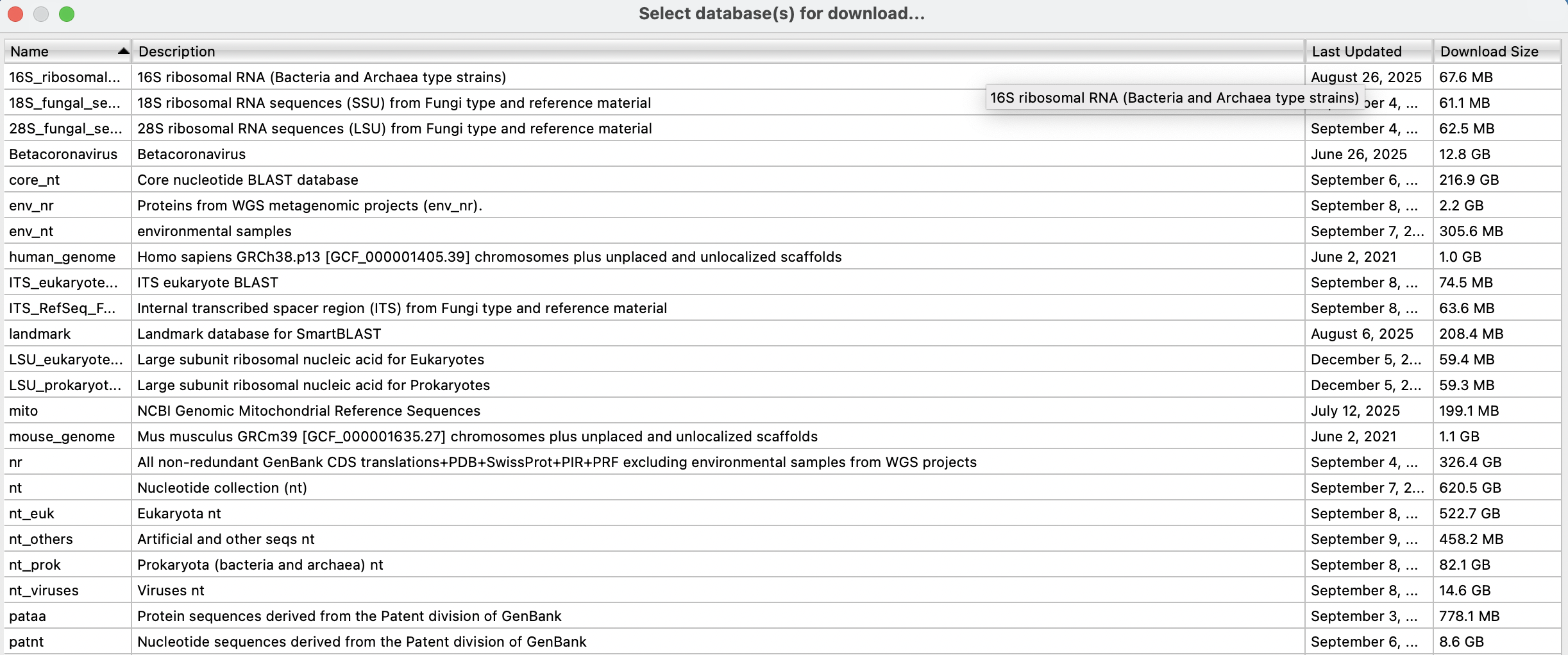
  • Seamless database setup — when you choose to download an NCBI database (even large ones like nt), Lasergene handles the download and decompression automatically. The database simply appears in your Search UI, ready to use.
  • Accessible to everyone — what used to require experienced bioinformatics setup can now be done by any user, right from the application menus.
Key Features of Local BLAST

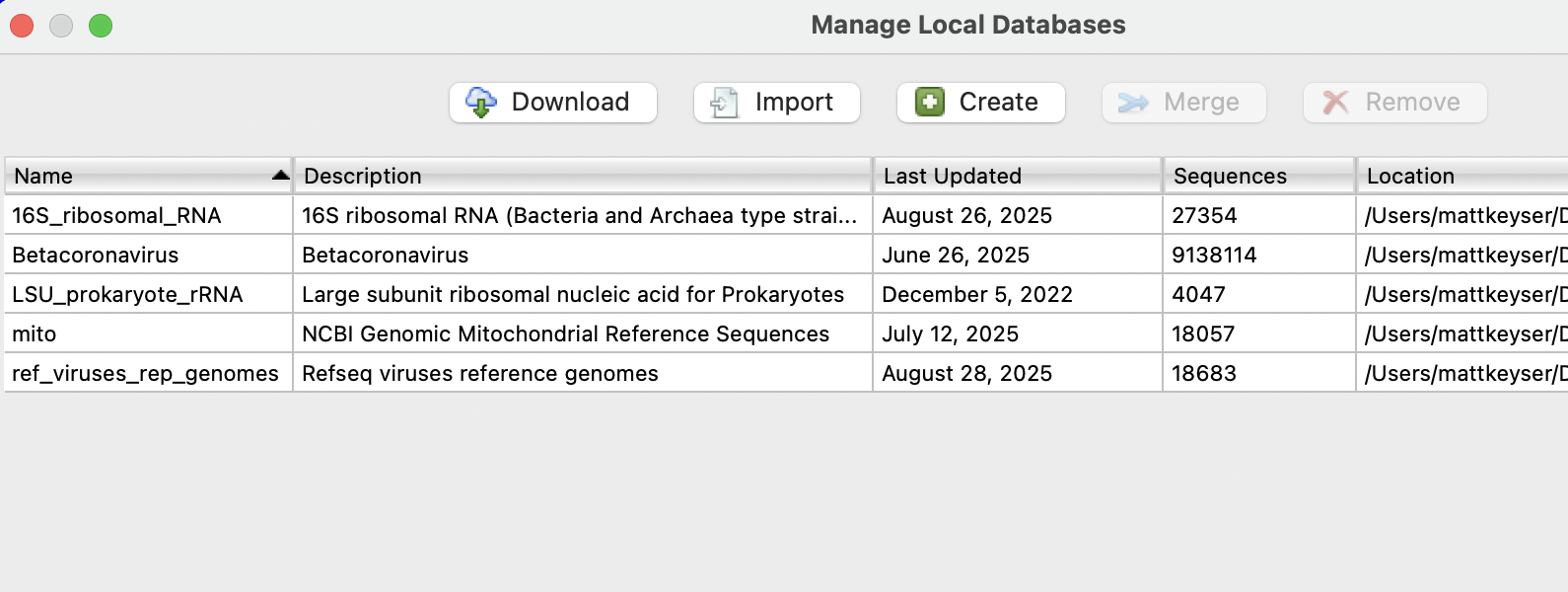
The Manage Local Databases interface (Search > Manage Local Databases) provides everything you need to build and maintain BLAST-ready databases:

  • Download NCBI databases — choose from 30+ databases for automatic download and decompression.
  • Import existing BLAST databases — work with databases you’ve already prepared.
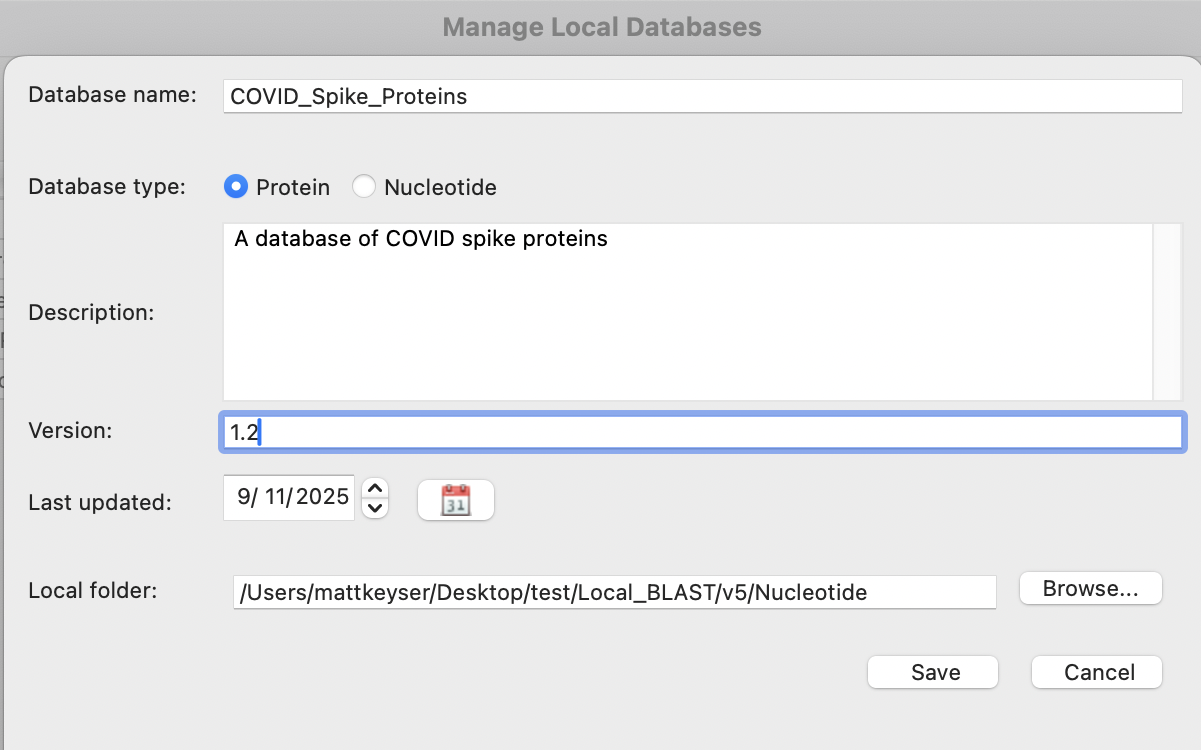
  • Create new custom databases — build BLAST-ready databases from your own sequence files, including DNASTAR formats like .msa and .sbp.
  • Merge multiple databases — combine different sources into a single, comprehensive resource.
  • Remove databases — keep your local environment organized.
How Local BLAST Search Works

  1. Open Search > Manage Local Databases in any supported Lasergene application.
  2. Download or create the database you want to use — for example, NCBI’s nt database, or a custom dataset like a panel of COVID-19 spike protein sequences.
  3. When ready to run a search, open the usual Search for Sequences dialog, choose the Local option, and select your preferred database.
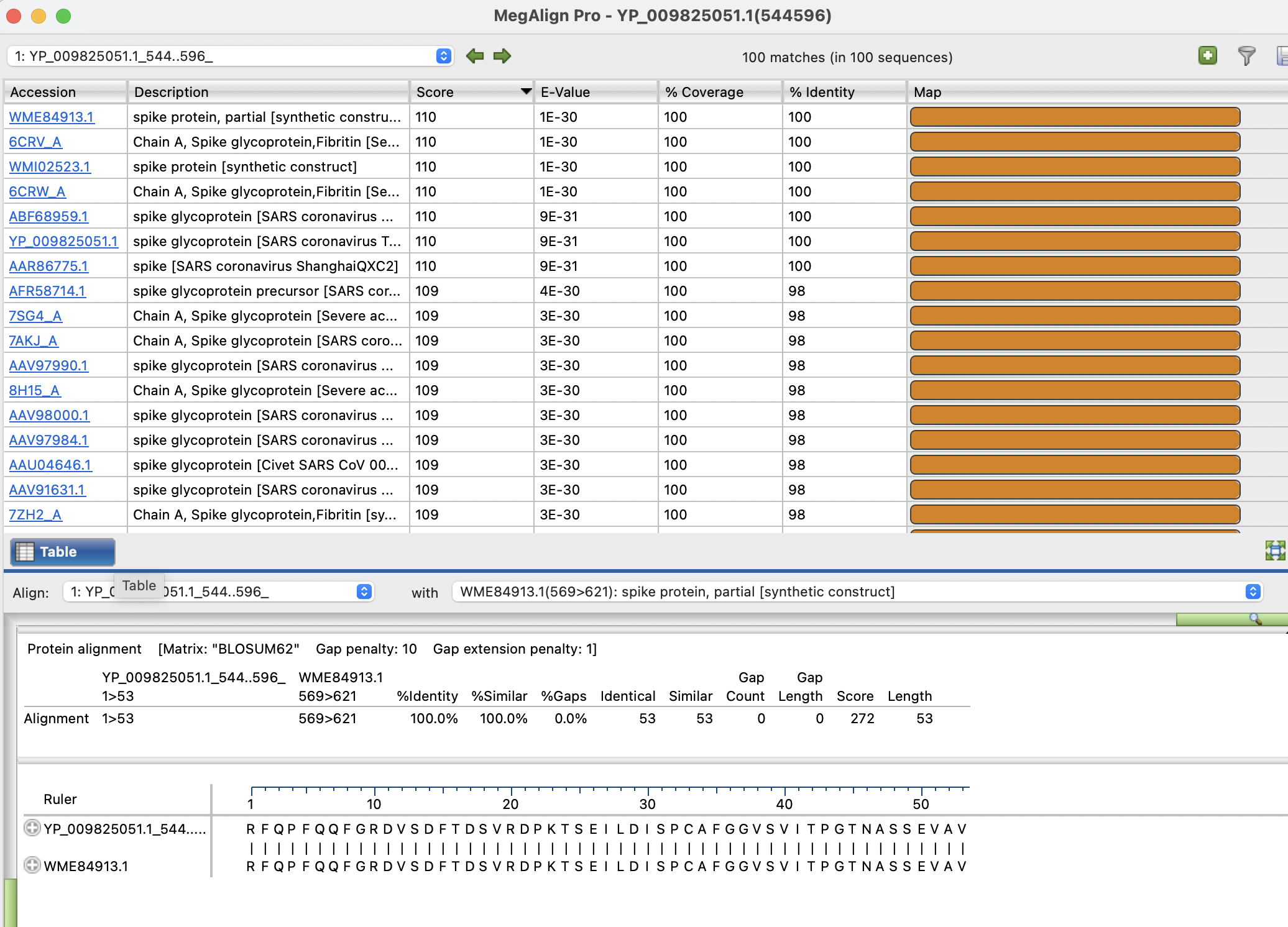
  4. Results are displayed instantly in the familiar Lasergene results table with % Identity, % Coverage, E-values, accession links, maps, alignments, and filtering tools.

Because the search runs locally, even large datasets return results in seconds.

Get Started with Local BLAST in Lasergene REQUEST FREE TRIAL SCHEDULE A DEMO Bring the speed and security of Local BLAST into your Lasergene workflows.
Request a Free Trial or Schedule a Demo with our team to explore how Local BLAST can accelerate your sequence analysis.
computer

Questions?

Our team of scientists is here to help!

CONTACT US

Or call (866) 511-5090

Scientists

Would you like to receive technical tips and special offers straight to your inbox?

DNASTAR
Pricing Workflows Training Software Resources Contact Us

Would you like to receive technical tips and special offers straight to your inbox?

2026 - DNASTAR Privacy Policy
This website uses cookies to improve user experience and understand our web usage. By continuing to use our website, you consent to our use of cookies. Accept
Privacy & Cookies Policy

Privacy Overview

This website uses cookies to improve your experience while you navigate through the website. Out of these, the cookies that are categorized as necessary are stored on your browser as they are essential for the working of basic functionalities of the website. We also use third-party cookies that help us analyze and understand how you use this website. These cookies will be stored in your browser only with your consent. You also have the option to opt-out of these cookies. But opting out of some of these cookies may affect your browsing experience.
Necessary
Always Enabled
Necessary cookies are absolutely essential for the website to function properly. This category only includes cookies that ensures basic functionalities and security features of the website. These cookies do not store any personal information.
Non-necessary
Any cookies that may not be particularly necessary for the website to function and is used specifically to collect user personal data via analytics, ads, other embedded contents are termed as non-necessary cookies. It is mandatory to procure user consent prior to running these cookies on your website.
SAVE & ACCEPT