


7 STEPS FOR VARIANT ANALYSIS

Chapter 3: Lasergene Genomics Use Case: Human Trio Analysis
In this section, we perform a trio analysis and show how to quickly reduce a large data set down to just a few variants of interest. We then explore one particular deleterious variant using integrated links to online databases.
Though Lasergene is not intended for clinical use, this chapter uses an imaginary example to explore using publicly available Genome in a Bottle data. Imagine a situation in which a teen develops a fever and inflammation in his abdomen and joints that lasts a couple days each month and then disappears. Neither of his parents have experienced this issue themselves, even as children. However, the family is of Ashkenazi Jewish decent; a population with a small number of founders, and which is thus prone to a higher frequency of deleterious recessive genes. The couple is interested in investigating whether their son’s issue may be genetic in origin.
Assuming we had DNA for the three family members, one approach would be to locate all SNPs for which the parents are carriers (i.e., they have one copy each) and the son has two copies. We could then see if any of those SNPs were known to result in the son’s symptoms. Because this is a scenario we invented just for this guide, we luckily have the data already: the Ashkenazi Jewish Trio samples from Genome in a Bottle. This trio will represent the family in our example.
Assembling Reads with SeqMan NGen
SeqMan NGen was used to assemble Illumina exome data from each of three family members to GRCh38. P14 human genome package. A BED file was utilized to capture targeted regions. The minimum depth was set to 20, P not ref (the chance that the called base does not match the reference) to 90%, and the minimum match percent to 96%. The assembly took approximately two minutes to set up on a laptop and was run on the cloud.
During assembly, SNVs were called using the diploid model and variants were annotated using DNASTAR’s Variant Annotation Database (VAD). The three assemblies took 20 minutes each to complete. The finished assemblies were over 60GB in size and were downloaded to an external hard drive for analysis.
Multi-Sample Variant Analysis in GenVision Pro
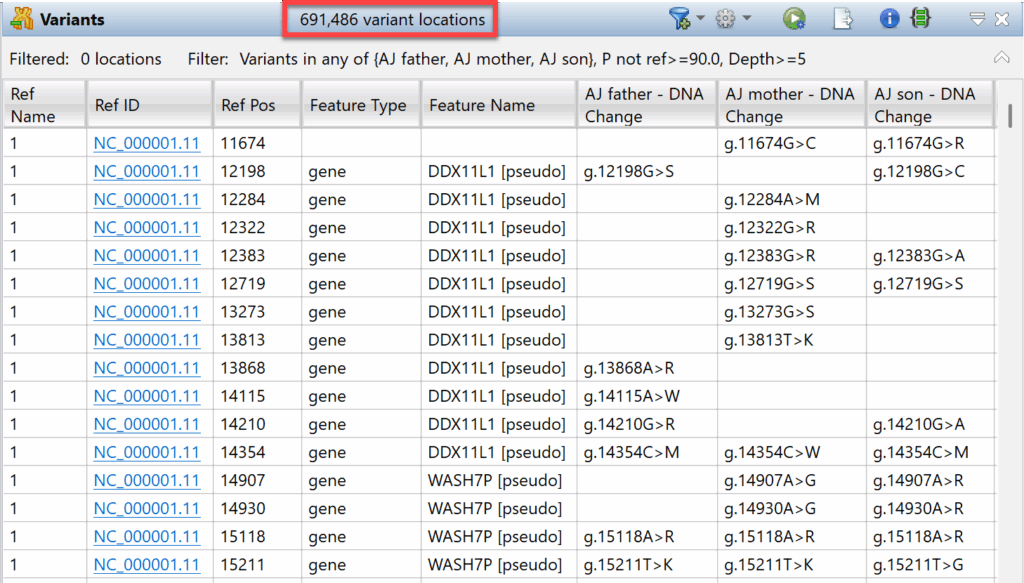
The three assemblies were uploaded into the GenVision Pro application. Next, an initial variants table was created by using the command Variants > Show Table > With Default Filter. SeqMan NGen located 691,486 variants in the three subjects (Figure 7).
Figure 7. A portion of the Variants view, which currently shows all variants that passed GenVision Pro’s “default” filter.
Next, we used a three-step multi-sample variant analysis workflow to home in on variants that might be causing the son’s issue.
Step 1: Find heterozygous variants shared by both parents
We know that neither parent is affected, but they are likely both carriers. To find all the heterozygous variants shared by the two parents and save them as a set, we followed this procedure:
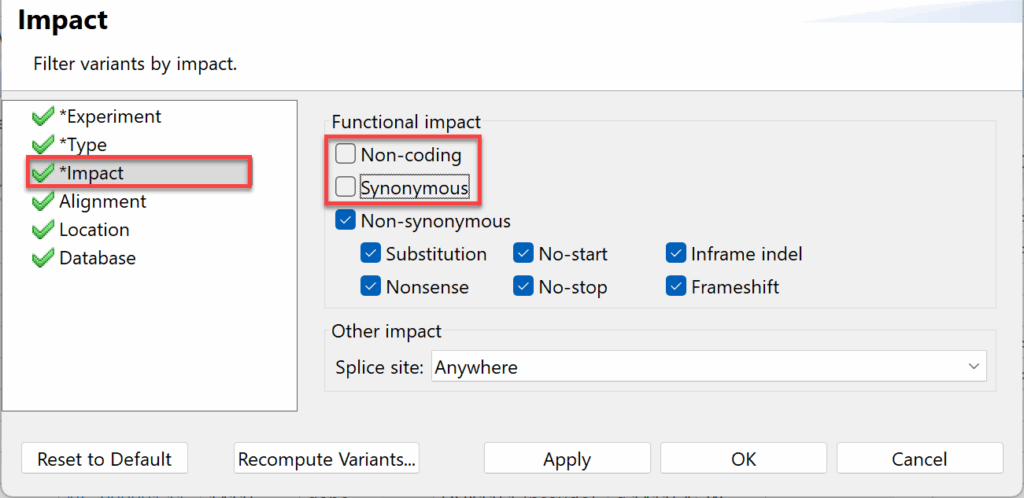
1) Choose Variants > Filter > Filter and set up three of the filter tabs as shown in Figures 8-10.
Figure 8. In the Experiment tab, choose Present in all selected experiments and check the boxes for the father and mother.
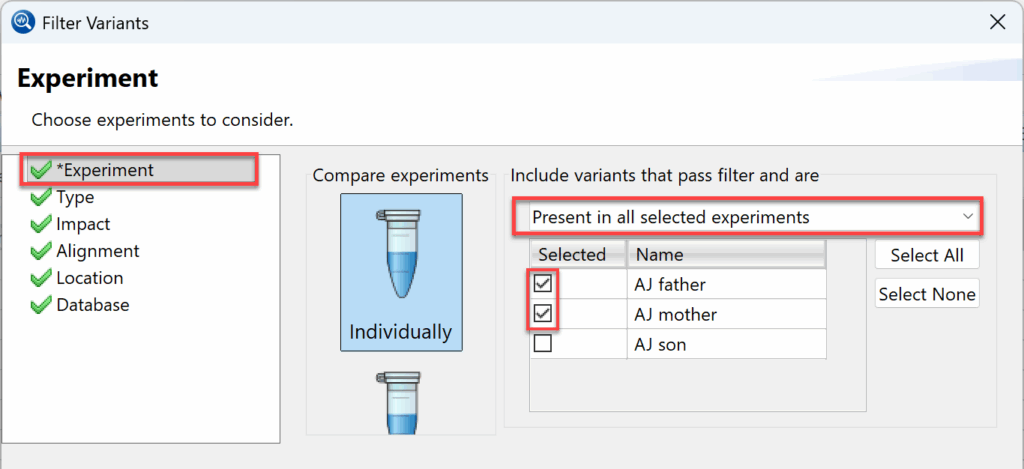 =
Figure 9. In the Type tab, choose the Heterozygous genotype.
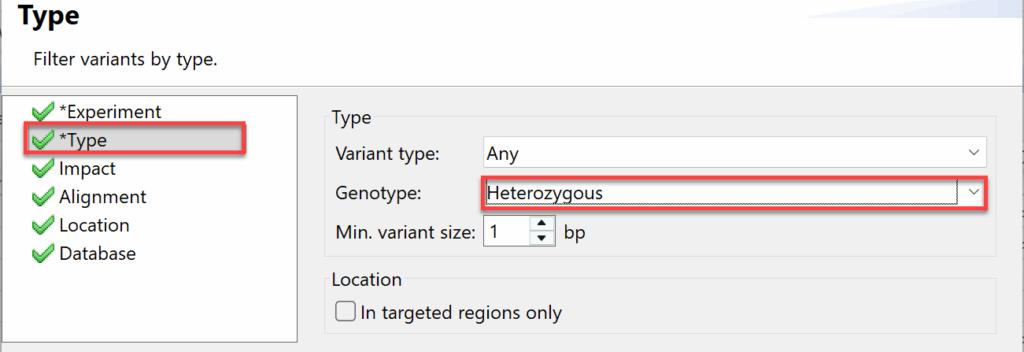 =
Figure 10. In the Impact tab, remove the check marks next to Non-coding and Synonymous and leave the others.
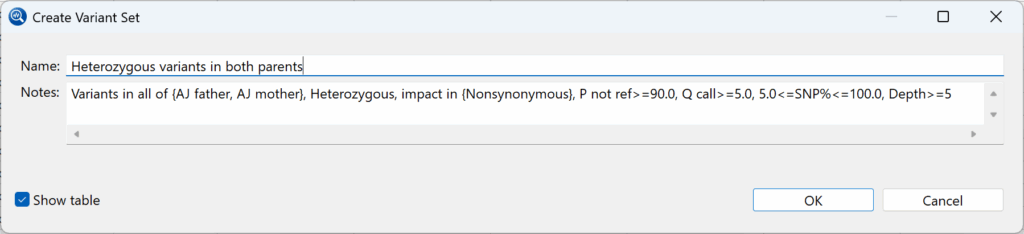
2) Press OK. Once the table has been created, use Variants > Create set of 2,889 Variant Locations to save the set. Name the set “Heterozygous variants in both parents” (Figure 11) and press OK.
Figure 11: Naming the first of the variants sets.
Step 2: Find homozygous variants in the son
We suspect the son has two copies of the deleterious variant. The next step is therefore to find all the homozygous variants in the son and save them as a set.
1) Click on the Variants tab to return to the original
2) Choose Variants > Filter > Filter. Set up the filter as before but check the box for the son only instead of the parents and select Homozygous as the genotype.
3) Click OK, then use Variants > Create set of 4,308 Variant Locations. Name the set “Homozygous variants in the son,” and press OK to save it.
Step 3: Find out which variants are common in both of these sets
An easy way to find all variants in the intersection between the sets is to use a Venn diagram based filter.
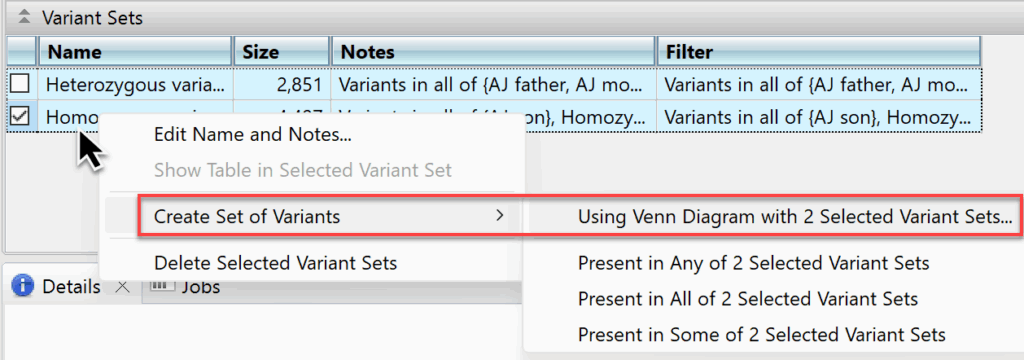
1) In the Variants Sets panel, select the two Right-click and choose Variants > Create Set of Variants > Using Venn Diagram with 2 Selected Variants Sets (Figure 12).
Figure 12: After saving multiple variants sets, you can use this command to compare those sets.
3) Click on the intersection between the sets and name the set “Shared variants” (Figure 13). Press OK.
Figure 13. The filtering dialog lets you compare sets based on selections in a Venn diagram.
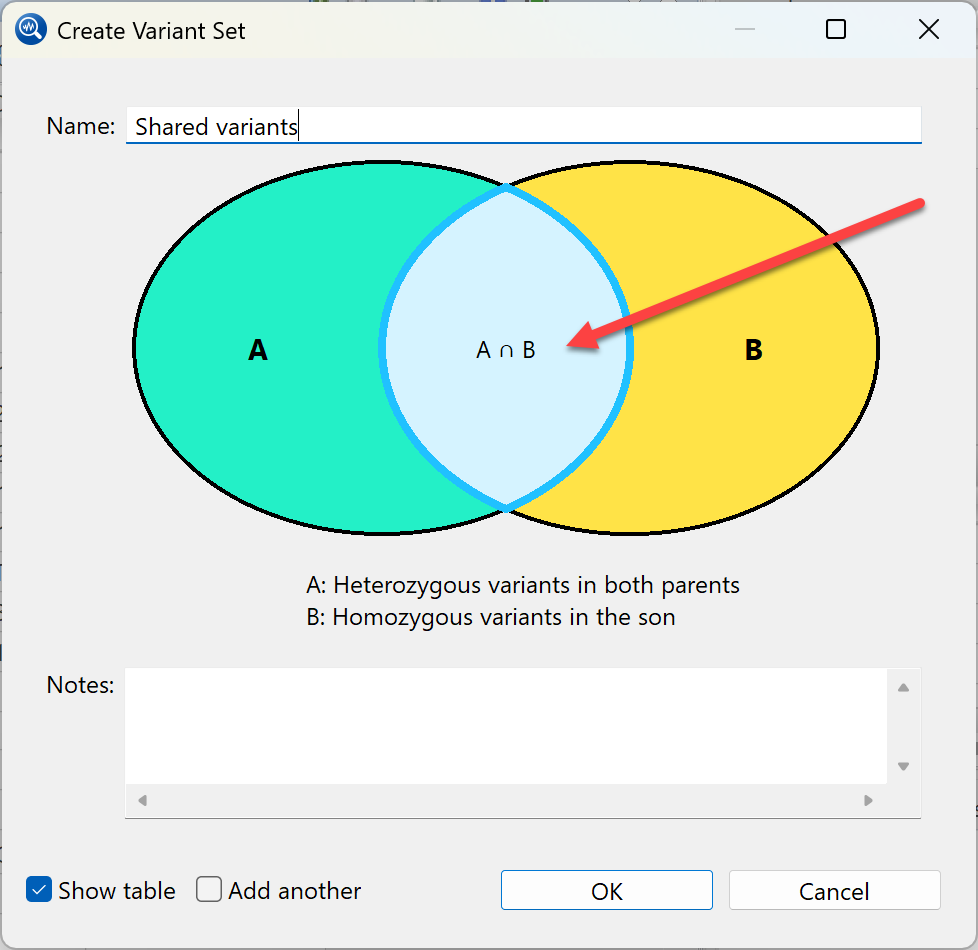
GenVision Pro found 534 variants that meet these specifications and displays them in a new tab called Shared variants.
Step 4: Exploring variants in the GenVision Pro Variants view
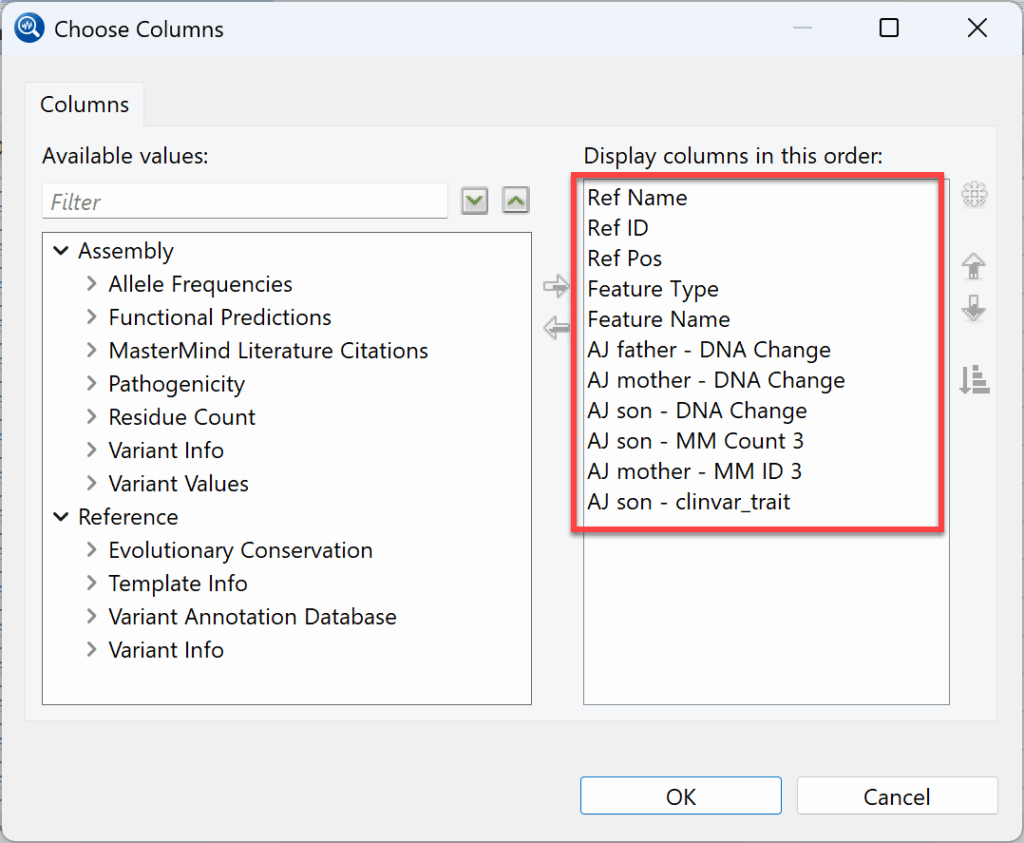
1) To select the data columns you wish to display, click the gear icon to open the Choose Columns dialog. We used this dialog to choose two columns related to Mastermind (“MM”) and another for ClinVar traits (Figure 14). Click OK.
Figure 14. GenVision Pro lets you customize the Variants view by choosing data columns and their order.
2) In the variants table, click on the MM Count 3 column twice to bring variants with the most Mastermind entries to the top of the table. The most commonly cited variant has 487 Mastermind entries and its ClinVar description (rightmost column) is “Familial Mediterranean fever” (Figure 15). Given the son’s symptoms, this sounds like a promising match.
Figure 15. The variant with 487 Mastermind entries is associated with Familial Mediterranean fever.

Taking a closer look at that row (Figure 16), we note that each parent has one copy of the normal “G” base at this position, and one copy of an “A” variant. The son has two copies of the “A” variant.
Figure 16. The variant row shows that each parent has one copy of this recessive, while the son has two copies.

Step 5: Looking at Mastermind and ClinVar entries for the variant
1) Click on the link to open the Mastermind entry for the variant (Figure 17).
Figure 17. The Mastermind entry for the variant associated with Familial Mediterranean fever.
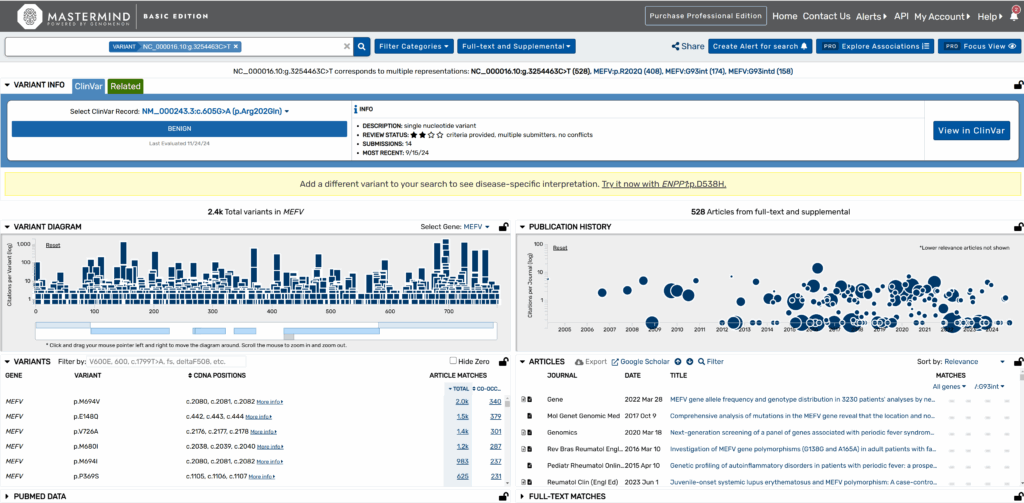
The entry confirms that according to the ClinVar record, the variant involves a G>A base change (Figure 18).
Figure 18. The ClinVar record description.

2) Click on the View in ClinVar button and then the Familial Mediterranean fever This opens a page with the following description (Figure 19).
Figure 19. A portion of the description on the ClinVar page.

This looks like a good match to the symptoms that have been observed in the son and merits further investigation by the medical team.