


As the Senior Product Manager for Lasergene, Matt Keyser works with scientists, software developers and support staff at DNASTAR to create sequence analysis software that meets the current needs of researchers and that is ready to support future challenges and changing technology. In his 17 years (and counting) at DNASTAR, Matt has advised numerous customers on a wide array of sequencing and analysis projects, giving him a unique understanding of the challenges faced by scientists today.
Introduction
If you have done multiple sequence alignment (MSA) using Lasergene’s MegAlign Pro or another product, you already know that there are a variety of alignment methods available: Clustal W, Clustal Omega, MAST, MUSCLE, MAFFT, DIALIGN, Mauve, and many more. Though each type represents a tradeoff in accuracy, speed, or number of customization options, the results will be similar for most sets of sequences.
One notable exception is if you need to align a large quantity (> 100) of viral genome sequences or align especially long viral genomes (e.g., SARS-CoV-2 at nearly 30 kb). Some algorithms, like CLUSTAL Omega, may perform well on larger data sets. But other widely used MSA algorithms like MUSCLE or CLUSTALW may fail outright or require excessive time to complete the alignment. Only MAFFT version 7, which is now available in MegAlign Pro 17.3, is capable of aligning the largest viral genome sets containing thousands of sequences in just minutes.
We recently sat down with Matt Keyser, DNASTAR Senior Product Manager, to ask what makes the MAFFT v.7 MSA algorithm special and how to use it within MegAlign Pro.
Where did MAFFT originate?
MAFFT (Multiple Alignment using Fast Fourier Transform) was developed by Kazutaka Katoh at the Osaka University Research Institute for Microbial Diseases (RIMD). The original MAFFT algorithm was published in 2002 and worked by aligning the sequences progressively, clustering them with the assistance of the Fast Fourier Transform algorithm.
The current version, MAFFT v.7 allows you to choose from a number of different alignment strategies, including global homology, conserved domains, iterative or progressive methods. To learn more about the tradeoff between speed and accuracy using the different algorithms, click here.
What data types can I use? Can I use MAFFT alignment with both nucleotide and protein sequences?
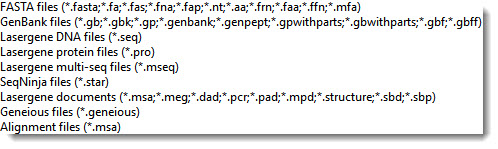
MAFFT can be used to align either amino acid or nucleotide sequences and supports a wide variety of sequence file types. The types supported in MegAlign Pro are shown in the list below.
What are the steps for using MAFFT in MegAlign Pro?
To align sequences in MegAlign Pro using the MAFFT alignment algorithm:
1) Launch MegAlign Pro 17.3 or later (to use the MAFFT v.7 method).
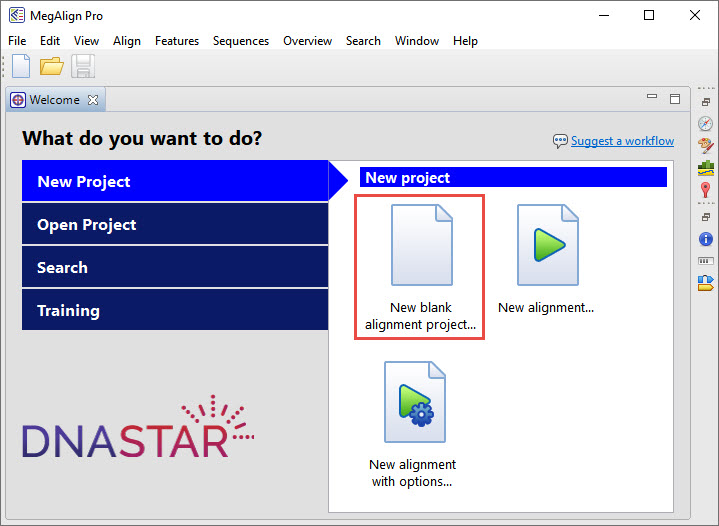
2) From the Welcome screen, choose New blank alignment project.
3) Click the green Add sequences to project tool.
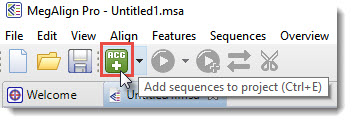
Choose the sequences you wish to align and press Open.
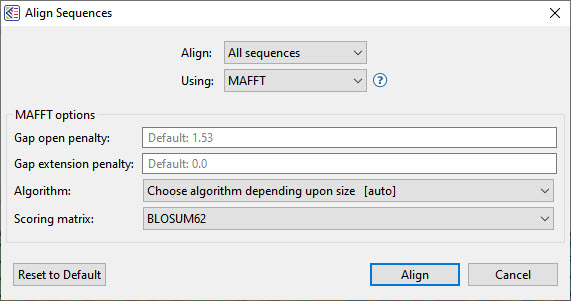
4) Click on the black triangle to the right of the Align using tool (boxed in red below) and choose whether to align using the MAFFT default settings or customized settings.
- To use the default settings, choose Align Using MAFFT.
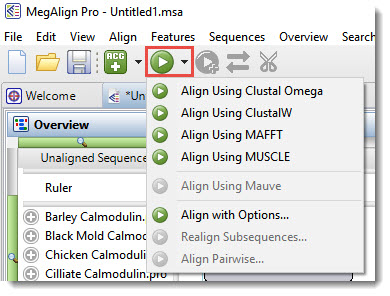
- To customize the settings, instead choose Align with Options. In the ensuing dialog, choose MAFFT from the Using Customize settings as desired, then press Align.
MegAlign Pro calculates the alignment and displays the results in a variety of useful and customizable views. The image below shows the Distance Table (top) and the Sequences view.
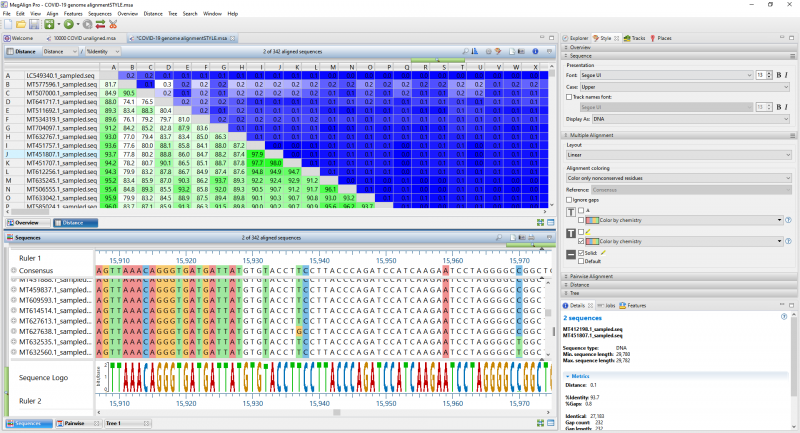
You can now apply customization options to reveal areas of disagreement, generate a distance table, create phylogenetic trees, search the sequences, view annotations, align pairs of sequences, add sequences from NCBI’s BLAST and Entrez databases to the alignment, export alignment data, and much more. For detailed help and tutorials, see the MegAlign Pro User Guide.
Why pay for MegAlign Pro when I can access MAFFT for free?
We all love free stuff! But once you try MegAlign Pro, I think you’ll agree with me that the ease of use, time savings, data security, and ability to analyze your results and export publication-quality images makes this software well worth the price.
Unlike free MSA algorithms, MegAlign Pro is a complete sequence alignment software package and includes everything you need for each stage of an alignment. Not only does it provide a variety of MSA and pairwise algorithms, but also the capability to visualize your results once the alignment is complete.
Let’s compare “free MAFFT” vs. “MAFFT alignment using MegAlign Pro” in four areas: installation, performing the alignment, analysis of the results, and support.
Installation
Free versions of MAFFT can be installed or run through a browser. Installation of MAFFT is unwieldy on most operating systems. On Windows, for example, you first need to make changes to your computer settings. Next, you need to run a series of command-line commands to install Ubuntu. Finally, you need to launch the Ubuntu terminal and type in a series of additional commands to install MAFFT. Some files used in this procedure are unsigned and may trigger system warnings.
By comparison, the Lasergene installation wizard lets you securely install Lasergene on Windows or Macintosh computers by pressing one radio button and a short series of Next buttons.
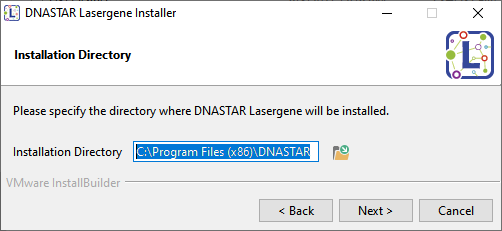
Not only does this quick procedure install MegAlign Pro, but it also installs all other applications in your Lasergene package.
Performing the Alignment
If you run MAFFT online, through a browser, you need to upload your data to an unsecured website, which is a big security risk. Also, the algorithm runs very slowly online, and you need to await an email with a link to the results.
By comparison, running MAFFT through MegAlign Pro involves two simple steps that take just seconds.
✓ Press one button to select the files you want to align. Your data is secure because it never leaves your personal computer.
✓ Press another button to choose and begin the alignment.
MegAlign Pro gives you the choice of five different algorithms—including MAFFT—for aligning both gene-level and genome-scale sequence data. MegAlign Pro performs multiple and pairwise sequence alignments quickly and easily, with most alignments calculated in just seconds. Need lots of capacity? In our tests, MegAlign Pro needed only two minutes to align 10,000 SARS-CoV-2 genomes using MAFFT.
Analysis of Alignment Results
In free versions of MAFFT, MSA results are displayed on black and white graphs. No downstream analysis options are available, and you cannot customize how results are displayed.
By contrast, MegAlign Pro offers the capability to visualize and analyze the completed alignment in vibrant color. MegAlign Pro guides you through the post-alignment process, allowing you to generate phylogenetic trees, separate interesting regions for new subalignments, edit and trim individual sequences or the entire alignment, and customize the appearance of your alignment before generating high-quality images that are suitable for publication.
Support
Free stuff = No support.
But when you license Lasergene, you have access to a team of live experts based in Wisconsin, USA. Ask your question via email, call us by phone, or request a free, personalized webinar where we can go through the workflow together using our data or yours. At DNASTAR, you will be talking to a real, live person experienced in laboratory research, just like you!
By the way, if you have any questions about this blog post or the workflow discussed here, you can reach me at [email protected].
Want to Try MegAlign Pro and the MAFFT Method with Your Own Data?
Click the button below to get a 14-day fully functional trial of Lasergene, including MegAlign Pro.
To get started with MegAlign Pro, I recommend following our step-by-step tutorial Perform a Clustal Omega alignment, which comes with downloadable data. The same procedure will work for any of the five alignment methods, including MAFFT. After you complete the tutorial, try the same steps using your own data and the MAFFT algorithm.

Leave a Reply
Your email is safe with us.